Extended
Enable or disable major functional modules based on usage requirements.
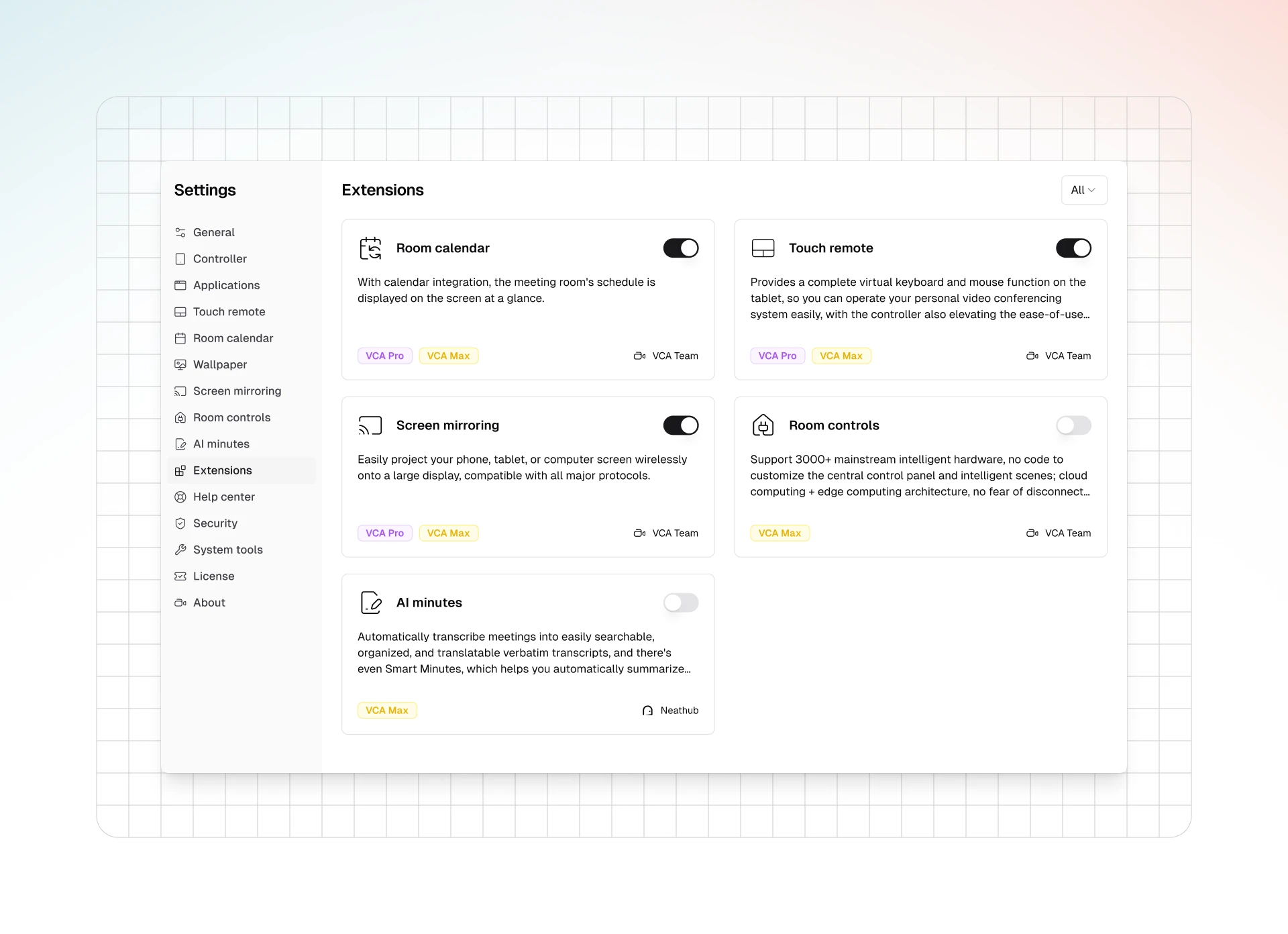
The Host software's "Extensions" settings allow you to enable or disable various major functional modules based on your license version (VCA, VCA Pro, VCA Max) and requirements.
1. Access Extension Settings
- In the Host software, go to "Settings".
- Select "Extensions" from the left navigation bar.
2. Enable or Disable Functional Modules
The "Extensions" page lists VCA's features in card format.
- Operation: Each feature card has a toggle switch in the upper-right corner.
- Turn on the switch to enable the feature.
- Turn off the switch to disable the feature.
- Version Limit: The VCA license versions that support the feature are indicated below the feature card. If your license does not support it, you cannot enable it or the functionality will be limited.
- Filter: There may be a filter in the upper-right corner of the page to display features by version.
3. Important Notes
- Disabling unnecessary features can simplify the interface and potentially optimize performance.
- Changes to feature enablement/disablement usually take effect immediately or after a restart.
- If a feature is unavailable, first check your license version and the switch status here.